Sunday, 31 January 2016

Flat Plan

I have created a FlatPlan of my magazine in order for the page order to be clearly laid out and during construction it will be easy to structure the magazine. This is just a vague example because when I am constructing my magazine I'm sure I will make it more detailed.


Saturday, 30 January 2016

Risk Assessment for photoshoots

I created a risk assessment (for health and safety purposes) because if any incident did happen I would be prepared to deal with it. I have covered the more likely risks because any other minor risks would be easier to deal with.


I think this thorough planning will help me in the long - run because it enables me to cover every aspect of the photoshoot and in turn my magazine overall.

Schedule for my photoshoot - main model

Below I have displayed a call sheet I made which entails the schedule of the photoshoot for my main model. It includes all the information necessary for my photoshoot to take place and also clearly maps out the plans for the day.

I contacted my model via text to see if this time and location was okay for her:


I also searched the route from my model's original location to the arranged location of the photoshoot on an app on my phone to make sure she would know how long the travel would take her and where she had to go, the route was already familiar to her but I did this to make it clear:


Below, I have displayed my schedule that I created for the publishing process of my magazine. I did this because schedules help to keep things organised and it has given me a brief overview of what I had to do and by when. It has helped me overall because it made things easier and told me each month what I had to complete so it helped me with my time management.


Friday, 29 January 2016

Plans for my magazine - double page spread


Above and below I have displayed hand drawn and computer made designs of my double page spread. On the computer I made two possible designs that I could use because they are quite similar and depending on what I prefer when I am constructing me magazine DPS, I like to have the option of how to change things around. 
Firstly, a sell line line will be displayed at the top left hand corner of the page to grab the readers's attention and to inform them of the context of the article. Beneath that there will be a headline which intrigues the audience and tells that what the music artist will be discussing in the article, it must be large and bold to make the page interesting. A stand-first will act as an introduction to the article and briefly summarise what the article will include and make the reader want to carry on reading. The body text, introduced by a drop capital (or other symbol which has the same effect) will be separated into columns which I will see how many and of what width when I come to constructing the page and putting everything together. I think the interview will branch out over both pages because smaller chunks of text will intrigue the audience more because it will seem like there is less to read and it is important that the read is easy for the niche audience. 
On the right page of the DPS the main image will be positioned over the top half, I have not yet decided whether I should use a plain background or find some sort of pattern or design to place behind the images and text, so when using the software Photoshop I will be sure to test some out and post the results on the blog. The image will be of my model with a guitar because it will represent her as artistic and enthusiastic about her chosen path of life; music. I was thinking of having a pull quote anchoring the image -either above or below- which will add more character to the page and if a reader is flicking through the magazine, it may catch their eye. Also the image will have a caption which briefly explains where/what they are doing.
The folio at the bottom of the page, may be featured on both pages and will include the page number, maybe masthead logo and perhaps social media networks that could be used to get in touch with the magazine. I think this design is appropriate and will look good when I create it.


Tuesday, 26 January 2016

First photoshoot trial

I asked my model to visit my school as it would enable me to use the camera, white screen and specialist lights. However on arrival we discovered the camera had not been charged so we took this as an opportunity to do some test shots with possible clothing and see how they would turn out. I used my iPhone to take the pictures with the soft lights and white screen (I also tested with the green screen). These are the lights I used (they are not on - clearly):


And here are some of the pictures produced:


I liked the ski jacket because it is bright and fresh and suits the model. In contrast I thought the black turtle neck and dungarees did not suit my model, I feel that they are too boring and will not make the magazine look interesting and different from others on the shelf. Obviously I had hoped for better images and the white screen was a bit crumpled, also the lights were not great. This is what made me come to the decision that I do not think I will use a white screen and lights for my front cover, I will use natural lighting as I feel it is more complimentary to my model and simply do the photoshoot against a plain wall. This photoshoot helped me because it made me realise the importance of preparing equipment and also helped me to come to decisions that I would otherwise have not come to; such as having to choose different clothing and location. Also it gave me time to over look my project and think about what poses I want my model to do and what props I will use.

Sunday, 24 January 2016

Brainstorm of images


Below I have displayed three brainstorms I created to explore different ideas of images I will use on my front cover, contents page and double page spread. I did this in order to consider my options and I think it is important to have excessive planning in order to get the best end product. Here are the brainstorms below:


Wednesday, 20 January 2016

Plans for my Magazine - contents page


These are my designs for my contents page, one hand drawn and the other created on a computer. At the top of the page I have placed my logo and the title 'Contents' followed by the date and issue number. The main image will be the background of the page but because there is a lot of content it may not take priority over other aspects. The three images on the right are going to be of my second model, who I will show in a later post, and maybe also a photo of a concert I attended. The Band Index will include bands and page numbers featured in the magazine and so will the features labelled 'reviews', 'live', and 'news'. The other image will be a picture of a male who is a musician and information about gigs he will be attending, along with a page number. The advertisement will probably be showing what competition I will be including in the magazine because the contents page offers a good opportunity for the audience to get intrigued and involved in the magazine.
At the strip at the bottom of the page, I will show the logo of Twitter and Instagram to show the audience that they can get in touch via many ways. I hope that I can make my real contents page look busy like this, whilst also making it exciting and representative of the indie genre.


Thursday, 14 January 2016

Contents page inspirations


I like the layout of the contents page I have shown above. I think the only problem is it doesn't say 'CONTENTS' at the top which I am going to be doing. The date is shown right below the  title which makes it clear and also bold as it is white amongst a black background.
I like the way the 'Band Index' is in red because it prioritises the importance of the information - people are most likely to look at this first and get intrigued into buying the magazine because of all the artists featured that may appeal to them. The main image seems busy as it represents a gig type of environment, instruments and presumably members of the band are closely positioned together. This symbolises the busyness of the page as there is a lot of writing and different colours which makes the page interesting.
Below the main image is anchor text which describes what the reader is looking at and adds more character to the page because the font is different.
The colour red shows all the important information e.g. logo, page numbers and band index etc whereas black is the main colour that shows most info.
There are arrows showing which page subjects were shown on the front cover so it is easy for the reader to find something they are looking for. I like this idea.


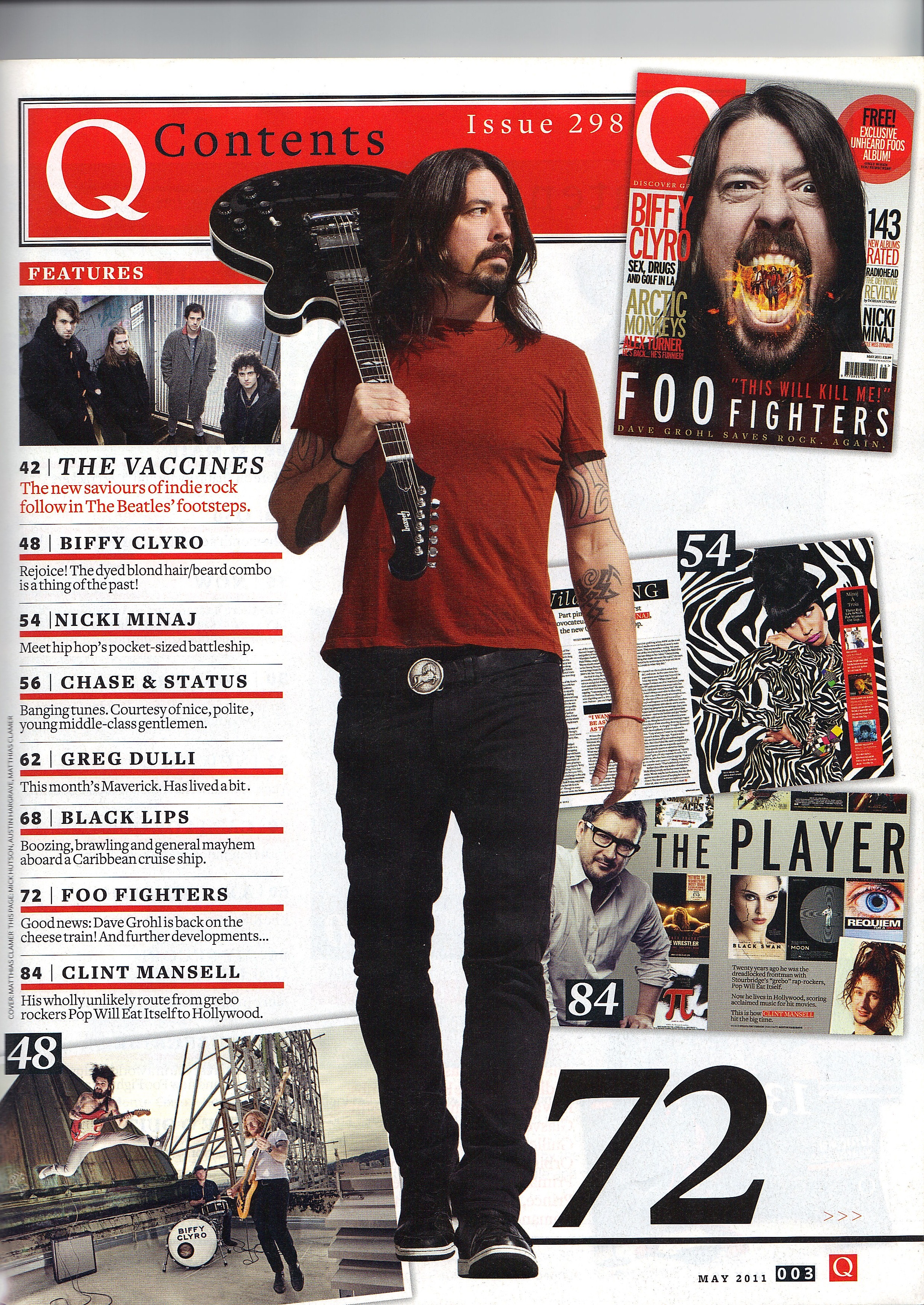
I also liked the style of this Q contents page because there are a few more pictures than the other which makes it more interesting. Also next to the main image is the page number which the story belongs to and the font is very large which is an intriguing aspect, that I may use.
The colours are bland which make the page dull, therefore I plan on using my colour scheme in an efficient way in which the colours contrast each other well. 
At the bottom of the page it shows the logo and page number etc. Along with this, I plan on adding social media information in order for the reader to get in touch via social media if they have any enquiries. Also it shows the reader that the magazine is modern and the means of contract are versatile, meaning you can get in touch in other ways than email or phoning up.